Playing DOOM inside WinDbg
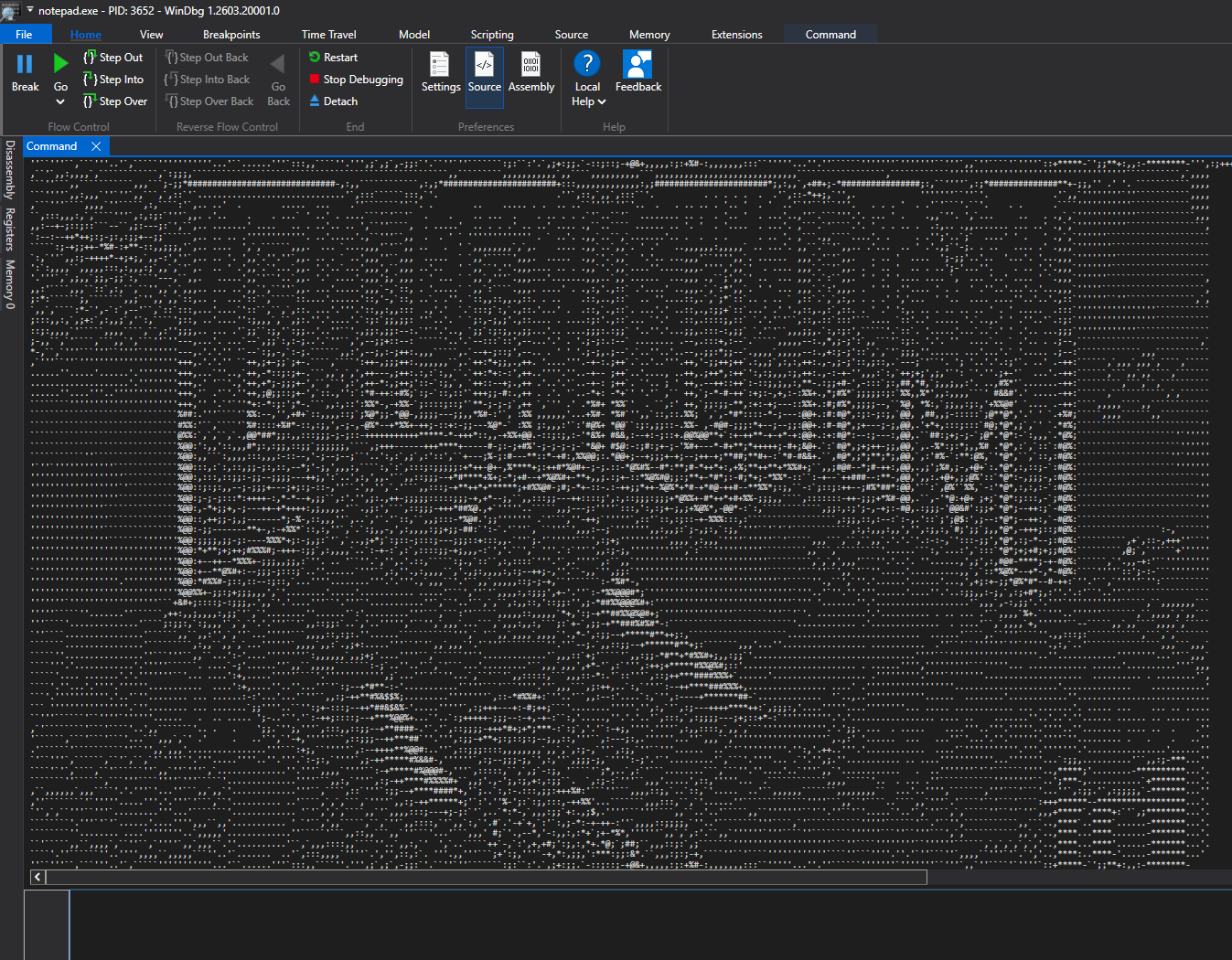
What?
For anyone that has used WinDbg, you might have found yourself automating tedious analysis tasks through scripts written in JavaScript, or compiled extensions, like drvtrace from eversinc33 for example. While reading guides on writing extensions, I came across this post by Kevin Gosse on writing WinDbg extensions in C# and building them using NativeAOT so they can be loaded in WinDbg, and what better first extension to build than a playable version of DOOM?
How?
Under the hood, the extension uses Managed Doom by Nobuaki Tanaka for all gameplay logic, including loading the DOOM IWAD, running the actual game, and producing each rendered frame, with the only exception being audio, which is completely disabled.
The extension handles everything between Managed Doom and WinDbg, such as the initialization logic so WinDbg can actually load it, handling commands and passing control to the main game loop, frame conversion to text, and forwarding user inputs to the game to make it “playable”.
[UnmanagedCallersOnly(EntryPoint = "doom")]
public static int Doom(IntPtr client, IntPtr argsPtr)
{
    try
    {
        using var output = new DbgEngOutput(client);
        string args = Marshal.PtrToStringAnsi(argsPtr) ?? string.Empty;
        args = args.Trim();

        if (args.Length == 0 || args == "?" || args == "/?" || args == "-?" || args == "help")
        {
            PrintHelp(output);
            return 0;
        }

        DoomHost.Run(args, output);
        return 0;
    }
    catch
    {
        return 1;
    }
}
Frames from Managed Doom are converted into text by outputting the frame into a 640x400 RGBA buffer, binning the pixels into a smaller grid based on the selected resolution (default is 160x50, I use 240x75), averaging the brightness of each character cell, and mapping it to a character from the following selection .'`,:;-+*#%@&$. Finally, each converted frame is outputted to the command window as text.
for (int row = 0; row < _charsH; row++)
{
    int yStart = (int)((long)row * _srcH / _charsH);
    int yEnd = (int)((long)(row + 1) * _srcH / _charsH);
    if (yEnd <= yStart) yEnd = yStart + 1;

    for (int col = 0; col < _charsW; col++)
    {
        int xStart = (int)((long)col * _srcW / _charsW);
        int xEnd = (int)((long)(col + 1) * _srcW / _charsW);
        if (xEnd <= xStart) xEnd = xStart + 1;

        int sum = 0;
        int count = 0;
        for (int x = xStart; x < xEnd; x++)
        {
            int colBase = x * _srcH * 4;
            for (int y = yStart; y < yEnd; y++)
            {
                int p = colBase + y * 4;
                sum += source[p] + source[p + 1] + source[p + 2];
                count++;
            }
        }

        int idx = (int)((long)sum * rampLen / (count * 3 * 256));
        if (idx > rampLast) idx = rampLast;
        _sb.Append(Ramp[idx]);
    }
    _sb.Append('\n');
}
User inputs are captured each tick and pressed keys are tracked using GetAsyncKeyState, which are then converted to game key codes. Input is only forwarded to the game when WinDbg or one of its close relatives is the active focused window.
public List<DoomEvent> Poll()
{
    Array.Copy(_curr, _prev, _curr.Length);
    Array.Clear(_curr, 0, _curr.Length);

    if (ShouldAcceptInput())
    {
        for (int vk = 1; vk < 256; vk++)
        {
            if (vk == 0x10 || vk == 0x11 || vk == 0x12) continue;
            short s = GetAsyncKeyState(vk);
            if ((s & 0x8000) == 0) continue;

            DoomKey k = DoomKeyMap.FromVk(vk, 0, false);
            if (k != DoomKey.Unknown)
            {
                _curr[(int)k] = true;
            }
        }
    }

    var edges = new List<DoomEvent>();
    for (int i = 0; i < _curr.Length; i++)
    {
        if (_curr[i] != _prev[i])
        {
            edges.Add(new DoomEvent(
                _curr[i] ? EventType.KeyDown : EventType.KeyUp, (DoomKey)i));
        }
    }
    return edges;
}
The project can be found here: https://github.com/t0asts/windbg-doom
A video showing gameplay can be found here: https://www.youtube.com/watch?v=lDo061NRSHg
Acknowledgment
Feedback and corrections are welcome.